阿里巴巴开源的 Druid 是 Java 语言的数据库连接池,提供了强大的监控和扩展功能。
本文讲述如何在 Spring Boot 项目中使用 Druid 数据库连接池。
教程基于文章 《Spring Boot MyBatis 学习教程》 配套的源代码进行扩展,添加 Druid 数据库连接池和监控的功能。如果读者对于 Spring Boot 如何使用 MyBatis 还不了解,可以先完成文章 《Spring Boot MyBatis 学习教程》 的阅读和学习。
添加依赖
在 pom.xml 文件添加当前最新版本的 Druid 依赖:
<dependency>
	<groupId>com.alibaba</groupId>
	<artifactId>druid-spring-boot-starter</artifactId>
	<version>1.2.4</version>
</dependency>
形成新的 pom.xml 文件:
<?xml version="1.0" encoding="UTF-8"?>
<project xmlns="http://maven.apache.org/POM/4.0.0" xmlns:xsi="http://www.w3.org/2001/XMLSchema-instance"
         xsi:schemaLocation="http://maven.apache.org/POM/4.0.0 https://maven.apache.org/xsd/maven-4.0.0.xsd">
    <modelVersion>4.0.0</modelVersion>
    <parent>
        <groupId>org.springframework.boot</groupId>
        <artifactId>spring-boot-starter-parent</artifactId>
        <version>2.4.1</version>
        <relativePath/> <!-- lookup parent from repository -->
    </parent>
    <groupId>me.leehao</groupId>
    <artifactId>mybatisdemo</artifactId>
    <version>0.0.1-SNAPSHOT</version>
    <name>mybatisdemo</name>
    <description>Demo project for Mybatis</description>
    <properties>
        <java.version>1.8</java.version>
    </properties>
    <dependencies>
        <dependency>
            <groupId>org.springframework.boot</groupId>
            <artifactId>spring-boot-starter-web</artifactId>
        </dependency>
        <dependency>
            <groupId>org.mybatis.spring.boot</groupId>
            <artifactId>mybatis-spring-boot-starter</artifactId>
            <version>2.1.4</version>
        </dependency>
        <dependency>
            <groupId>com.alibaba</groupId>
            <artifactId>druid-spring-boot-starter</artifactId>
            <version>1.2.4</version>
        </dependency>
        <dependency>
            <groupId>mysql</groupId>
            <artifactId>mysql-connector-java</artifactId>
            <scope>runtime</scope>
        </dependency>
        <dependency>
            <groupId>org.springframework.boot</groupId>
            <artifactId>spring-boot-starter-test</artifactId>
            <scope>test</scope>
        </dependency>
    </dependencies>
    <build>
        <plugins>
            <plugin>
                <groupId>org.springframework.boot</groupId>
                <artifactId>spring-boot-maven-plugin</artifactId>
            </plugin>
        </plugins>
    </build>
</project>
Druid 配置
application.yml 配置如下:
server:
  port: 6080

spring:
  datasource:
    druid:
      username: root
      password: 12345678
      url: jdbc:mysql://localhost:3306/mybatis?useUnicode=true&characterEncoding=utf-8&useSSL=true&serverTimezone=UTC
      driver-class-name: com.mysql.cj.jdbc.Driver
      initial-size: 8
      max-active: 16
      min-idle: 1
      max-wait: 60000

      web-stat-filter:
        enabled: true
        url-pattern: /*
        exclusions: "*.js,*.gif,*.jpg,*.png,*.css,*.ico,/druid/*,"

      stat-view-servlet:
        enabled: true
        login-username: admin
        login-password: admin
        reset-enable: false
        url-pattern: /druid/*

mybatis:
  mapper-locations: classpath:mapping/*Mapper.xml
  type-aliases-package: me.leehao.mybatisdemo.entity

logging:
  level:
    me:
      leehao:
        mybatisdemo:
          mapper : debug
其中,数据库连接基本配置:
username:数据库用户名称password:数据库密码url:JDBC 连接字符串driver-class-name:数据库驱动类名称
连接池配置:
initial-size:连接池建立时创建的初始化连接数max-active:连接池中最大的活跃连接数min-idle:连接池中最小的连接数max-wait:获取连接等待超时的时间
Druid 内置一个 StatViewServlet 用于展示 Druid 的统计信息,对 StatViewServlet 的配置,主要是配置 stat-view-servlet,包括:
enabled:是否启用 StatViewServlet (监控页面),默认为falselogin-username:监控页面登录的用户名称login-password:监控页面登录的用户密码reset-enable:是否允许清空统计数据url-pattern:根据配置中的url-pattern来访问内置监控页面,例如/druid/*,则内置监控页面的首页是/druid/index.html
Druid 提供 WebStatFilter 用于采集 web-jdbc 关联监控的数据。对 WebStatFilter 进行配置,主要是配置 web-stat-filter,包括:
enabled:是否启用 WebStatFilter,默认值falseurl-pattern:需要监控的 urlexclusions:需要排除一些不必要的 url,比如*.js,/jslib/*等
运行测试
浏览器打开地址:http://localhost:6080/druid/index.html,其中,端口 6080 为上面 application.yml 配置的 server.port。使用 admin 用户和 admin 密码登录 Druid 的监控页面。
随机调用几次 http://localhost:6080/user/1 接口,可以看到监控页面有相关的监控展示:
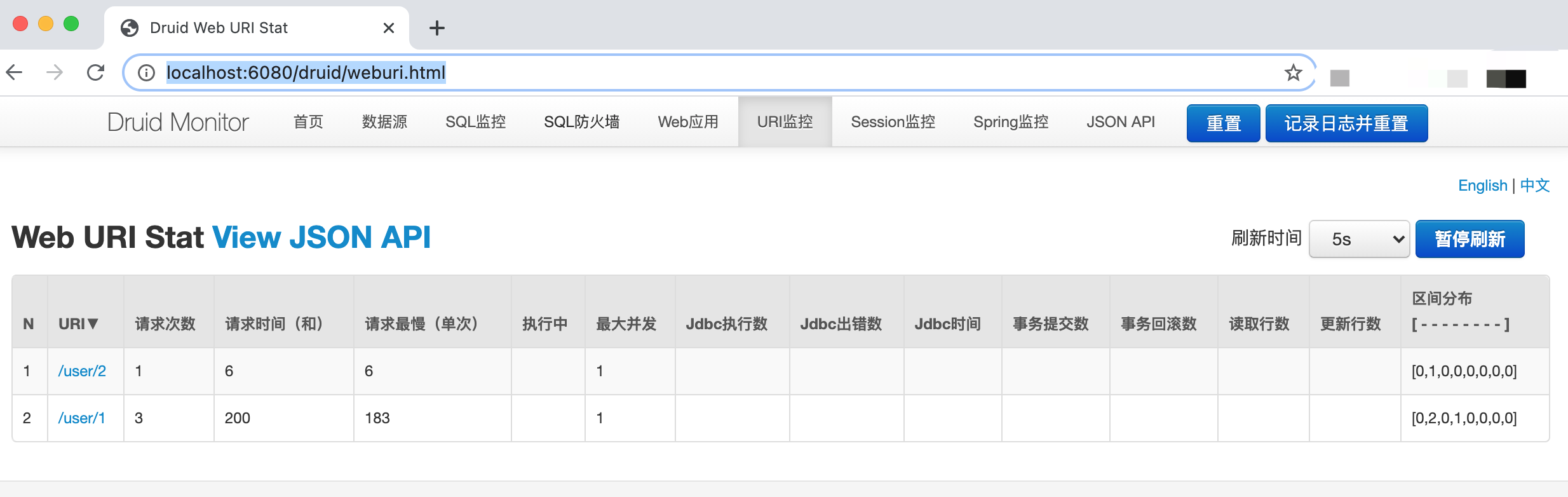
其他监控数据这里不再阐述,可以参考官方文档。
参考资料
- https://github.com/alibaba/druid
- https://github.com/alibaba/druid/tree/master/druid-spring-boot-starter/
- https://github.com/alibaba/druid/wiki/%E9%85%8D%E7%BD%AE_StatViewServlet%E9%85%8D%E7%BD%AE
- https://github.com/alibaba/druid/wiki/%E9%85%8D%E7%BD%AE_%E9%85%8D%E7%BD%AEWebStatFilter
- https://github.com/alibaba/druid/wiki/Druid%E8%BF%9E%E6%8E%A5%E6%B1%A0%E4%BB%8B%E7%BB%8D